Pro Tools is a digital audio workstation (DAW) developed by Avid, widely used for recording, editing, and mixing music. It’s considered the industry-standard DAW in professional studios around the world. Pro Tools provides a complete set of tools to create, record, edit, and mix audio—helping artists bring ambitious musical ideas to life. In fact, more Grammy-winning records have been produced on Pro Tools than any other DAW. Whether you’re an experienced engineer or a home studio musician, Pro Tools offers the power and flexibility to craft professional-quality music.
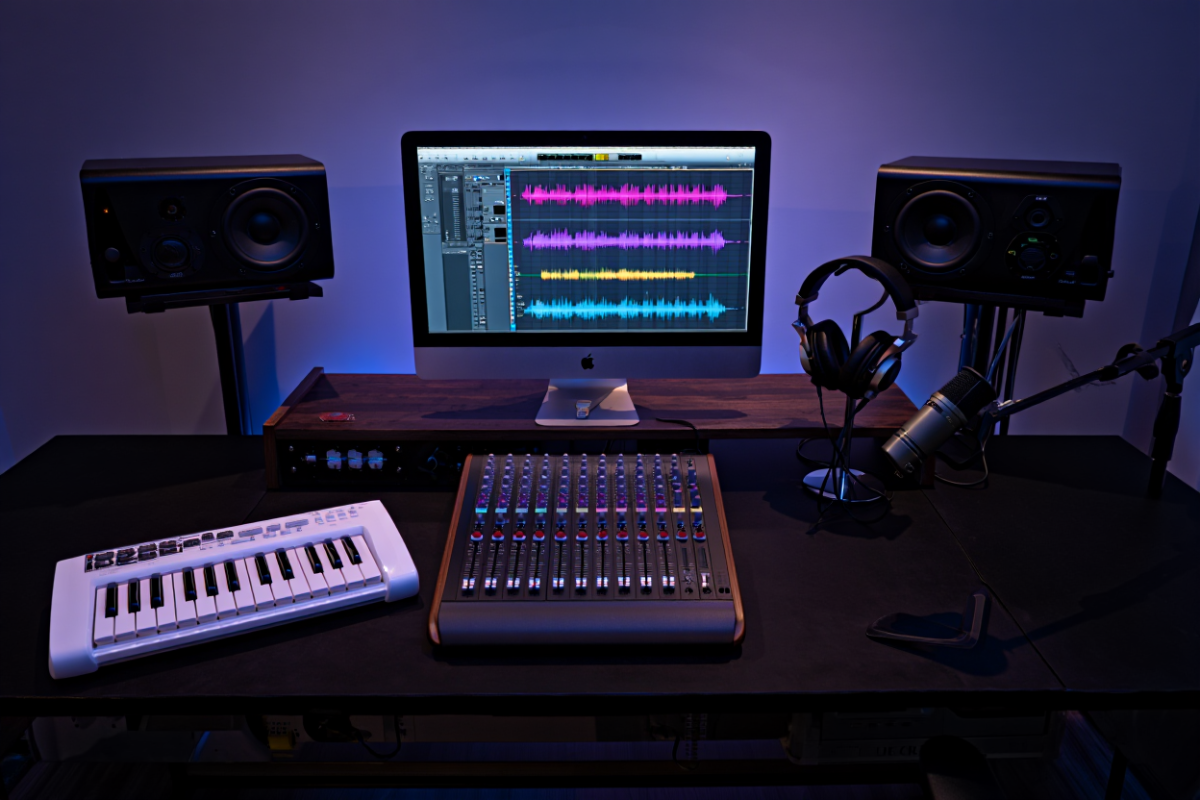
Professional audio recording studio setup running Avid Pro Tools software.
For example, Pro Tools can function like a multitrack tape recorder and mixing console all in one, with advanced features like non-destructive editing and real-time pitch/time manipulation. Its timeline interface displays audio, MIDI, and even video tracks side by side, and you can add virtual instruments or plug-in effects that run in real time. The software supports high-quality audio (16-bit, 24-bit, or 32-bit float at sample rates up to 192 kHz), and can mix in surround sound or even Dolby Atmos. In short, Pro Tools provides everything you need to turn raw recordings into a polished mix.
Why Choose Pro Tools for Music Production
-
Industry Standard: Pro Tools is the go-to DAW for professional studios and top engineers. (More Grammy-winning records have been made with Pro Tools than any other DAW.) Using Pro Tools means working in the same “language” as recording veterans and session players.
-
Complete Toolkit: It delivers everything needed for recording, editing, and mixing in one environment. From multitrack audio/MIDI recording to advanced MIDI sequencing and comping, you won’t need to switch software mid-project.
-
Rich Sound Library: A Pro Tools subscription comes with a huge collection of virtual instruments, loops, and effects. For example, Pro Tools Intro includes Xpand!2 – a synth workstation with 1,200+ presets – plus 34 studio-quality plug-ins (EQs, compressors, reverbs, etc.). Subscribers also get free new plugins and sound packs each month.
-
Reliability: Built for demanding sessions, Pro Tools is known for rock-solid stability. It was designed to handle large track counts and heavy real-time processing without crashing, which is essential when recording expensive studio time or critical film audio.
-
Hardware Integration: Pro Tools tightly integrates with Avid hardware (audio interfaces and control surfaces) for near-zero latency recording and tactile mixing. It also supports standard file formats (WAV, AIFF, BWF, Dolby Atmos ADM) and plug-in formats (AAX) used across the industry.
Pro Tools Editions and Versions
Avid offers several editions of Pro Tools to fit different needs and budgets. The free entry-level version is Pro Tools Intro, which gives beginners the core recording and mixing tools without cost. Pro Tools Intro includes 36 essential effects and instrument plugins, and supports up to 8 audio tracks, 8 instrument tracks, and 8 MIDI tracks per session. It’s a great way for newcomers to try the software.
Paid plans start with Pro Tools Artist ($9.99/month), a step-up version for solo music creators. Pro Tools Studio ($39.99/month) is the core music production tier, offering unlimited track counts, advanced editing features, and a full plugin suite. The flagship Pro Tools Ultimate ($99.99/month, formerly Pro Tools HD) is designed for large productions and post-production. It supports the highest track counts (up to 768 audio/MIDI tracks) and includes specialized tools like integrated Dolby Atmos mixing. All paid subscriptions include continuous software updates and premium support.
If you prefer traditional licensing, note that Avid reintroduced perpetual (one-time) licenses in 2023 for Pro Tools Studio and Ultimate. Whether you subscribe or buy, you can download Pro Tools for Windows or Mac from the official Avid website or the Avid Link desktop app.
Pro Tools vs Logic Pro X
A common question is how Pro Tools compares to other DAWs, especially Apple’s Logic Pro X. The platforms have different strengths: Pro Tools runs on both Windows and macOS and is a subscription-based industry standard used in recording and post-production studios. Logic Pro X is Apple’s DAW for macOS only, with a one-time purchase model. Logic is often praised for its user-friendly interface and rich virtual instrument library (great for songwriting and electronic music), while Pro Tools is favored for its deep audio editing workflow and collaboration in professional environments. In short, Logic may be easier for beginners on Mac, but Pro Tools offers a universal, professional workflow that many studios require.
Getting Started with Pro Tools (For Beginners)
New users can quickly begin making music with Pro Tools. After installation, the Setup process guides you through creating your first session (analogous to a project). You then add audio or instrument tracks and route your inputs. Press the Record button to capture performances. Pro Tools’ editing tools are intuitive: you can cut and trim waveforms directly on the timeline, and use features like Elastic Audio to time-stretch or pitch-shift recordings without resampling.
Pro Tools Intro (the free edition) comes with built-in tutorials and sample content. For example, it includes Xpand!2, a versatile synthesizer with 1,200+ ready-made sounds (drums, keys, strings, etc.), plus hundreds of high-quality loops from Loopmasters and 34 studio-essential plug-ins (EQs, compressors, reverbs, delays, amp simulators). This means beginners have plenty of sounds and effects out of the box to experiment with.
Avid’s website offers Getting Started guides and video tutorials, and the official Learn & Support section has step-by-step documentation. There are also many free tutorials online. For instance, the LANDR blog published an “Easy Guide for Beginners” covering Pro Tools 2024 features and basic workflows. YouTube channels and online courses (free and paid) can walk you through recording your first track, using MIDI instruments, and building a mix.
In practice, a simple Pro Tools workflow might be: create a new session, set your sample rate, record audio on armed tracks or program MIDI on instrument tracks, then edit clips (cutting takes, comping, etc.), add plug-ins (EQ/compression to clean up recordings, reverb/delay for space), and finally use the Mixer window to adjust levels and panning. When you’re happy, use Bounce to Disk or Export Session to render the final mix. This end-to-end process — from tracking to mixdown — can all happen inside Pro Tools.
Pro Tools System Requirements
Pro Tools is a high-performance application, so meeting the official system requirements is important. Avid recommends at least a 64-bit processor (Intel or Apple Silicon), and a minimum of 16 GB RAM. Supported operating systems include Windows 10 (22H2) or Windows 11 (latest update), and macOS 13/14/15 (Ventura, Sonoma, or Tahoe). You will need a solid-state drive with about 15 GB of free space for the software installation, plus extra drive(s) dedicated to storing audio files.
Other requirements include an internet connection (for initial download and activation) and an iLok account or iLok dongle for licensing. If you plan to use Pro Tools | HDX or Carbon hardware, you’ll need the appropriate PCIe slot and drivers. Avid publishes a detailed compatibility chart, so always double-check that your computer and any audio interface are on the supported list. In summary, a modern Mac or Windows PC with 16GB+ RAM, SSD storage, and recent OS will run Pro Tools smoothly.
Pro Tools Plugins and Virtual Instruments
Pro Tools uses the AAX plug-in format for effects and instruments. Practically all major audio plug-in developers (Waves, Universal Audio, iZotope, etc.) offer AAX versions of their popular plugins, so you can expand Pro Tools’ capabilities. The software itself comes with a vast plugin library. For example, it includes convolution reverb, dynamic EQs, guitar amp simulators, drum machines, and more. The Xpand!2 instrument (in Intro) is just one example – the full Pro Tools Artist/Studio editions include many more synthesizers, samplers, and loops.
Additionally, Avid regularly adds new sounds and effects for subscribers. As noted above, your Pro Tools subscription delivers free new plugins and sound packs every month on top of the massive collection already included. And because Pro Tools supports common formats like WAV and MIDI, you can import loops or stems from virtually any source.
The bottom line: as you get comfortable with Pro Tools, you have an enormous array of built-in tools at your fingertips, plus virtually limitless third-party plugins. This lets you shape and enhance your music with studio-grade processing without leaving the Pro Tools environment.
Pro Tools Learning Resources and Tutorials
Learning a complex DAW like Pro Tools can seem daunting, but there are many helpful resources. A good starting point is Avid’s own Learn & Support site, which includes official documentation, video tutorials, and community forums. The Avid Knowledge Base (see articles) answers technical questions, while community forums (on Avid’s site, Reddit, Gearspace, etc.) let you ask peers.
For structured tutorials, check out blogs and courses. As mentioned, the LANDR blog’s Pro Tools: Easy Guide for Beginners breaks down the DAW’s core concepts step by step. Many audio-engineering YouTube channels also have free “Pro Tools tutorial for beginners” videos that walk through interface basics, recording, editing, and mixing. Paid online courses (e.g. LinkedIn Learning, Groove3) can be worth it if you want comprehensive coverage. Books on Pro Tools (and multi-DAW recording) are available as well.
Finally, practice is key: try recording simple projects – like a guitar and vocal or a MIDI drum loop – and experiment with editing, comping, and mixing them. Over time you’ll learn shortcuts and workflow tips that make Pro Tools even more powerful.
Producing Music in Pro Tools: Step-by-Step
Here’s a quick outline of a typical music-production workflow in Pro Tools:
-
Create a New Session: Set project parameters (sample rate, bit depth). Name your session and choose a drive for session files.
-
Set Up Tracks: Add audio tracks for microphones or instruments, and/or MIDI/Instrument tracks for software synths. Assign inputs (microphones, guitars, MIDI controllers).
-
Record Performances: Arm tracks and hit Record. Play or sing your parts. You can record multiple takes in one clip, then comp the best segments.
-
Edit Recordings: Use tools like trim, split, and heal to clean up clips. If timing is off, use Elastic Audio to align beats or vocals. You can also double-track or copy regions as needed.
-
Add Instruments/Plugins: Insert virtual instruments on MIDI tracks (e.g. drum samplers, pianos). Apply audio effects on tracks or in sends – EQ to balance tone, compression for dynamics, reverb/delay for depth, etc.
-
Mix the Session: Open the Mixer window. Adjust faders and panning to blend tracks. Automate volume or effects parameters for dynamic changes. Use the master fader for overall level control.
-
Bounce/Export: When ready, bounce the mix to a stereo file (or stems) using Bounce to Disk. Choose file format (WAV/MP3, sample rate) and render the final mix. Your song is now exported and ready for mastering or distribution.
By following these steps, you’ll cover all essential stages: tracking, editing, arranging, and mixing – all within Pro Tools.
Conclusion
Pro Tools offers a pro-grade environment for music production. Its comprehensive toolset, stability, and industry-standard workflows empower creators to produce music like a pro. Whether you’re a beginner starting with the free Pro Tools Intro or a professional using Ultimate, mastering Pro Tools will elevate your audio projects. Be sure to meet the system requirements, explore the bundled plugins, and take advantage of Avid’s tutorials and community.
Ready to get started? Download Pro Tools Intro and try it out, or sign up for a free trial of Pro Tools Studio. Join online forums or comment below with your own tips and experiences—sharing knowledge helps everyone improve. And if you found this guide helpful, share it on social media so fellow musicians can start producing like pros too!
Frequently Asked Questions
Q: What is Pro Tools used for?
A: Pro Tools is a digital audio workstation (DAW) used for recording, editing, and mixing music and sound. Musicians and engineers use it to capture live instruments and vocals, sequence MIDI instruments, edit tracks, apply effects, and create final audio masters. It’s widely used in music production, film post-production, broadcast, and more.
Q: Is Pro Tools free?
A: Avid offers a free version called Pro Tools Intro. It includes essential audio/MIDI tools and 36 instrument/effect plugins. However, Intro limits you to 8 audio tracks, 8 instrument tracks, and 8 MIDI tracks per session. The full-featured versions (Pro Tools Artist, Studio, Ultimate) require a paid subscription or license.
Q: How do I download and install Pro Tools?
A: You can download Pro Tools software from Avid’s official site. Go to the Avid Store or the Avid Link desktop app, create/sign-in to your account, and download the installer. If you already have a subscription or perpetual license, you’ll find the latest installers in your Avid account. Make sure your computer meets the system requirements before installing.
Q: What are the system requirements for Pro Tools?
A: Pro Tools requires a modern 64-bit system. Specifically, you need a 64-bit Intel or Apple Silicon CPU, at least 16 GB of RAM, and a fast drive with ~15 GB free space. Supported OS versions include Windows 10/11 (latest updates) and macOS (Ventura, Sonoma, or later). You’ll also need an internet connection for initial download/activation and an iLok account (or iLok key) for licensing.
Q: What is the difference between Pro Tools Intro, Studio, and Ultimate?
A: Pro Tools Intro is the free edition (8-track limit) for learning and basic projects. Pro Tools Studio is the standard DAW for music creation – it has unlimited tracks, advanced editing, and full plugin support. Pro Tools Ultimate is the flagship version for large-scale productions and post (formerly HD); it supports the most tracks (up to 768 audio/MIDI) and immersive formats like Dolby Atmos. Each step up adds more tracks, features, and professional workflows.
Q: Which is better, Pro Tools or Logic Pro X?
A: It depends on your needs. Pro Tools is cross-platform and widely used in professional studios, especially for recording live bands and audio post-production. Logic Pro X is Mac-only and often preferred by indie musicians and composers for its one-time purchase model and strong MIDI/instrument tools. If you plan to work in a pro studio or use Windows, Pro Tools is essential. If you’re on Mac and want an all-in-one music production suite, Logic could also be a good choice.
Q: What plugins come with Pro Tools?
A: Pro Tools includes a large suite of built-in plugins. Every edition comes with tools like EQs, compressors, reverbs, delays, modulation effects, amp simulators, and virtual instruments. For example, Pro Tools Intro features Xpand!2 (a multi-engine instrument) and 34 “studio essentials” plugins. Higher editions add even more instruments and effects. Additionally, Pro Tools supports third-party AAX plugins from companies like Waves, UAD, iZotope, and many others. Avid also gives subscribers new plug-ins regularly.
Q: How can beginners learn Pro Tools?
A: Beginners should start with hands-on practice and tutorials. Use Pro Tools Intro to experiment without cost. Follow a basic tutorial (LANDR’s guide, YouTube videos, or Avid’s own “Getting Started” guides) to learn the interface. Record simple projects (like an acoustic guitar and vocal) to get comfortable with tracks and editing. Read the Pro Tools Reference Guide (PDF) for detailed info on features. And ask questions on forums or social media if you get stuck. With consistent practice, you’ll become proficient with Pro Tools’ workflow.
Each of these FAQs targets common queries about Pro Tools (including our main keywords) and provides concise, helpful answers for readers and search engines.